0/5
Based on 0 Reviews

Smartsupp

Smartsupp is an all-in-one customer engagement platform that combines live chat, AI shopping assistants, and automated chatbots. Trusted by over 100,000 e-commerce websites, it is designed to convert online visitors into loyal customers by resolving queries 24/7, automating repetitive tasks, and seamlessly connecting with human agents.

Company Information

Product Information

Smartsupp is a customer service and e-commerce conversion platform that combines live chat, automated chatbots, and AI shopping assistants into a single dashboard. It helps businesses automate up to 80% of common customer questions, track visitor behavior via video recordings, and connect via multiple channels.

Core Features:

AI Shopping Assistant & Chatbots:

- Smartsupp’s AI (often referred to as "Mira AI") can answer technical or common questions, learn from your product feeds, and guide users to make purchases.

- Configurable handover rules allow the chatbot to transfer ongoing conversations seamlessly to human operators when needed.

Live Chat & Multichannel Inbox:

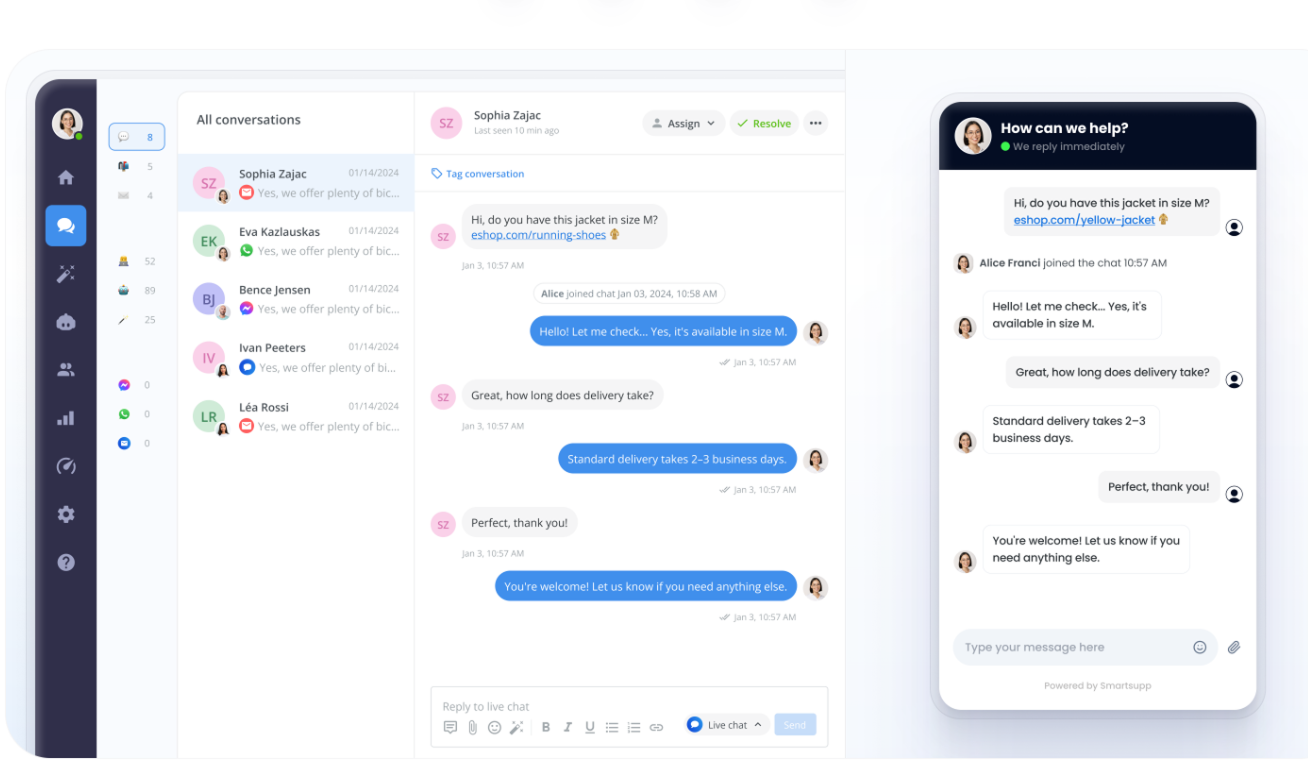
- Manage customer communications across your website chat widget, Facebook Messenger, and email in one unified dashboard.

- Mobile apps for iOS and Android let you reply to customers on the go, similar to sending a text message.

Visitor Session Recordings:

- Watch playback videos of how users navigate your store. The tool allows you to fast-forward through inactivity to spot pain points in the buyer journey.

Automated Triggers & Forms:

- Set rules to automatically greet visitors, offer discounts, or guide them through specific web pages when they meet certain conditions.

- Capture leads by collecting contact emails even when your team is offline.


Why Businesses Use It:

Smartsupp is widely used by e-commerce websites and freelancers across Europe and globally to drive online sales. Instead of dealing with abandoned carts or missed messages, businesses use the AI features to provide 24/7 shopping assistance while capturing visitor data to re-engage them later.
Smartsupp Specifications

Smartsupp

Palachovo namestí 799/5, Stary Lískovec625 00 BrnoCzechia.
Customer Chat Conversational AI Live Chat
Language Support English
Business Type B2B (Business-to-Business), SaaS (Software as a Service) platform
Headquarters Location Sumavska 31, 602 00 Brno, Czech Republic.
E-commerce Platforms
Website Builders:
Messaging & Social Media
Analytics platforms
support@smartsupp.com

Services and Focus

Client Focus

Industry Focus

Key Features of Smartsupp

  • Live Chat
  • E-mail
  • Messenger
  • WhatsApp
  • AI & AUTOMATIONS
  • AI Agents / AI Assistants
  • AI Reply Assistant
  • Automation Workflows
  • Reporting & Analytics
  • Lead Generation
  • Mobile SDK

Smartsupp Screenshots

1
1

Smartsupp Video

Smartsupp Pricing

Free
$ 0/year

Just exploring?

  • 1 operator
  • 25 conversations per month
  • Limited 14-day history
  • Live chat, WhatsApp, Messenger
Get Started Free
Solo
$ 17/mo

Handling it alone?

  • 1 operator
  • Unlimited conversations
  • All channels + Email (3u00d7)
  • Basic automated messages
  • 50 AI reply assists per month
Start your 14-day trial
Plus
$ 25/mo

Growing a team?

  • 3 operators
  • Unlimited conversations
  • All channels + Email (10u00d7)
  • Automated workflows
  • 250 AI reply assists per month
Start your 14-day trial
Expert
$ 83/mo

Larger team?

  • 5+ operators (upgradable)
  • Unlimited conversations
  • All channels + Email (50u00d7)
  • Automated workflows
  • Premium support
  • 500 AI reply assists per month
Start your 14-day trial

0

0 reviews

5
0
4
0
3
0
2
0
1
0

Frequently Asked Questions

Since we launched the new version of Smartsupp, the way to invite agents on your account is different as we made it more secure. The email address of the agent should be added here: https://app.smartsupp.com/app/dashboard/settings/agents and the agent will receive the invitation by email. After accepting the invitation, the agent will be redirected to our Smartsupp page where they will need to enter their name as agent and create a new password.

The Contact form allows you to collect the name, email address and phone number of the visitor when you are offline. Thanks to that, you will be able to contact the visitor at any time. You can also enable this form when you are online so you will always have the visitoru2019s information. The Contact form can be enabled in your settings here: https://app.smartsupp.com/app/dashboard/settings/chat-box/authorization-form. The visitor should write his message, click on the send button then the form will appear. The form appears after in order to encourage the visitor to send the message they have already written.

In the new version of Smartsupp, we have decided to give more freedom to our users and to make it easier for them to customize the text of the chat box. If you want to change the text of the chat box and to use your own words, you can simply do it in your settings here: https://app.smartsupp.com/app/settings/chatbox/options (Screenshot: https://prnt.sc/uxsuy2) It is very important to save the changes after. In the new Smartsupp, there is no need to use API to customize the text of the chat box.

As you might have noticed, in the new Smartsupp, the email notifications for offline messages are sent to all the email addresses of active agents on the account by default. If you are not receiving notifications by email, please make sure that this feature is activated in your settings here: https://app.smartsupp.com/app/settings/notifications. You can also check your spam folder. If you do not want to receive email notifications, you can deactivate this option on the same page.

We often get questions about whether we have mobile apps or not as most of you need to chat on the go, wherever you are. We are glad to inform you that we have mobile apps for both Android and IOS. You can easily install our mobile app and you will be always ready to help your visitors. For Android: https://www.smartsupp.com/help/android/ For IOS: https://www.smartsupp.com/help/iphone/

If you have a multilingual website and several agents on the account, it might happen that each agent will want to have their dashboard in the language that they are supporting. Or, if the dashboard was set up in the wrong language by default, it can be quickly corrected.