0/5
Based on 0 Reviews

Tinkercad

Tinkercad is a free, web-based 3D design and modeling platform developed by Autodesk. It enables users to create 3D models, design electronic circuits, and learn coding concepts through an easy-to-use drag-and-drop interface. Because it runs entirely in a web browser, no software installation is required.

Company Information

Product Information

What is Tinkercad?

Tinkercad is a free, web-based 3D design and modeling platform developed by Autodesk. It enables users to create 3D models, design electronic circuits, and learn coding concepts through an easy-to-use drag-and-drop interface. Because it runs entirely in a web browser, no software installation is required.

Tinkercad is widely used by beginners, students, teachers, makers, and hobbyists for creating 3D printable models, product prototypes, educational projects, and electronics simulations.

Key Features of Tinkercad :

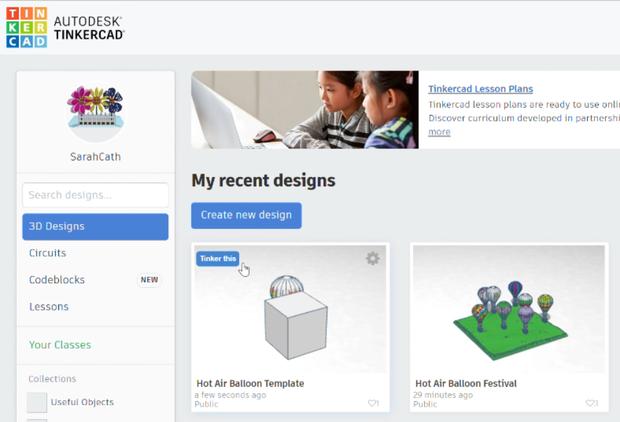
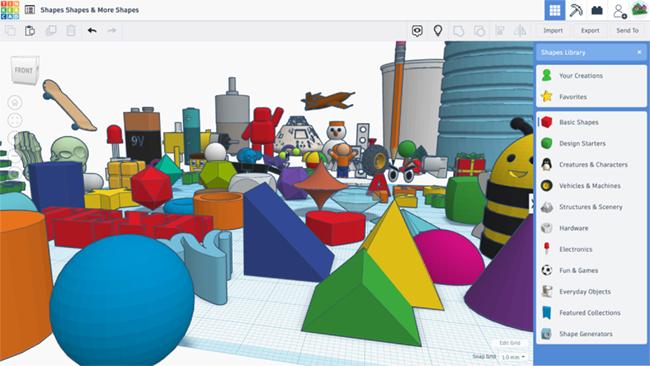
3D Modeling: Create and edit 3D designs using simple geometric shapes.
3D Printing Support: Export models in STL, OBJ, and 3MF formats for 3D printing.
Circuit Design: Build and simulate electronic circuits, including Arduino-based projects.
Codeblocks: Learn programming concepts by creating 3D models with visual coding blocks.
Cloud-Based Access: Save and access projects from any device with an internet connection.
Collaboration Tools: Share designs and collaborate with classmates, teachers, or team members.

Who Uses Tinkercad?

Students and educators
Beginners learning 3D design
Hobbyists and makers
STEM programs and schools
DIY product designers
3D printing enthusiasts

Benefits of Tinkercad:

Completely free to use
No installation required
Beginner-friendly interface
Supports electronics and coding projects
Extensive educational resources
Compatible with most 3D printers
Tinkercad Specifications

Tinkercad

Autodesk, Inc. 111 McInnis Parkway. San Rafael, CA 94903 USA
3D Printing Software Drawing CAD Software Electrical Design Software
Language Support English, German, Portuguese
Business Type StartUps, SMBs, Mid-Market
Headquarters Location San Rafael
tinkercad.support@autodesk.com
8008733375

Services and Focus

Client Focus

Industry Focus

Key Features of Tinkercad

  • 3d Design
  • Circuits
  • Codeblocks
  • Shape Generators
  • Importing 3d Models
  • Exporting 3d Models
  • Collaboration Tools
  • Library Of Shapes
  • Measurement Tools
  • Align Tool
  • Grouping And Ungrouping
  • Workplane Tool

Tinkercad Screenshots

1
1
1
1

Tinkercad Pricing

0

0 reviews

5
0
4
0
3
0
2
0
1
0

Frequently Asked Questions

Tinkercad is a free, browser-based 3D design, electronics, and coding platform developed by Autodesk. It is designed for beginners, students, educators, and hobbyists who want to create 3D models and prototypes.

Yes, Tinkercad is completely free. Users can access its 3D design, electronics simulation, and coding tools without any subscription fees.

No. Tinkercad runs directly in a web browser, so there is no need to download or install any software.

You can create: 3D models for printing, Product prototypes, Mechanical parts, Educational projects, Electronic circuits, Coding and robotics, projects

Yes. Tinkercad features a simple drag-and-drop interface, making it one of the easiest 3D design tools for beginners.

Yes. Tinkercad allows users to export designs in STL, OBJ, and other formats commonly used by 3D printers.

Yes. Users can share designs with others and collaborate on projects, making it useful for classrooms and team-based learning.

Yes. Tinkercad is widely used in schools and educational institutions for teaching 3D design, engineering concepts, electronics, and coding.

Yes. Tinkercad Circuits enables users to design, simulate, and test electronic circuits, including projects using Arduino components.

Tinkercad works best on desktop and laptop browsers, though some features may be accessible on tablets with compatible browsers.